Product · October 21, 2026 · 14 min read
WildDraw Audience Backing: How Reactions and Gems Now Decide Who Wins
WildDraw battles on Whistlr are now scored by audience backing. Learn how reactions, WTC Gems and combos add points, and how creators turn wins into income.
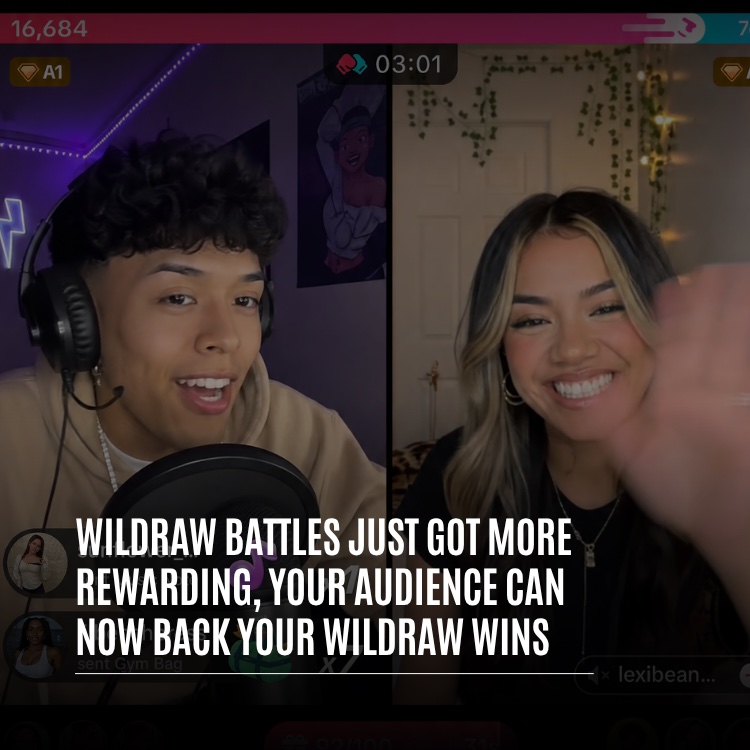
WildDraw battles on Whistlr are now scored entirely by audience backing. Every free reaction a viewer sends to a creator adds points to that creator's side, every WTC Gem adds points based on its price, rapid-fire support builds combo multipliers, and whoever holds the higher score when the three-minute clock runs out takes the win. For creators running Whistlr as a business, that means the people who support you are no longer just funding your channel. They are deciding your results in public. This guide explains the scoring rules, what happens on screen, how results are recorded, what it means for your income and how to prepare your channel to win.
WildDraw Battles Now Run on Audience Backing
WildDraw began as a live, head-to-head creative battle between two creators. Over time it added group battles, replay highlights and leaderboards, and a later update brought monetization along with the ability for business accounts to host and sponsor battles next to creators. Each of those changes focused on the people performing. This one focuses on the people watching.
Until now, viewers had two separate ways to take part. Voting influenced who won. Gems paid the creator. Both were valuable, but they did different jobs in different places, so a generous viewer who sent a large Gem near the end of a battle did not necessarily affect the outcome. Audience backing joins those two actions together. Support is now the score, and the score decides the result.
In practice, this gives every battle four new qualities:
- Support counts as points: reactions and Gems sent to a side add to that side's total as they happen.
- One shared battle: scores, reactions, Gems and chat stay in sync for both creators and every viewer, so nobody sees a different version of events.
- Visible credit: recent backers appear next to the creator they supported, and the top gifter is named when the round ends.
- A lasting record: wins, losses and draws are saved, including your record against each individual opponent.
For a creator business, the shift is significant. Before, a battle could be exciting and still leave the people who paid for it feeling like spectators. Now the support you earn and the result you get are the same thing, measured on the same bar, in front of the same room. That makes every battle a clear, public demonstration of how engaged your audience really is, which is useful whether you are building a fan base, selling products or pitching yourself to brands.
The WildDraw Scoring Rules, Explained
The scoring system is designed so a new viewer can understand it within seconds of joining. That matters for creators, because an audience that understands the rules is an audience that participates.
Choosing a Side
Both creators appear next to each other, split by a VS badge, under a shared score bar. As the round opens, chat receives a message announcing the battle and urging viewers to support their side. Backing someone starts with a tap on that creator's half of the screen, and anything the viewer sends afterward is credited to that creator. There is no shared pot. Support always goes to a specific creator.
Reactions: Free Points for Everyone
Emoji reactions cost nothing, and each one adds points to the side the viewer is backing. This keeps the door open for the whole room. A first-time visitor who wandered in from the live tab and a fan who has watched for months can both push their favorite forward, which keeps rooms large and lively even when not everyone is ready to spend.
WTC Gems: Points Weighted by Price
Gems are where a battle can swing. They are scored by price, with every cent counting as one point, which makes a $1 Gem worth 100 points and a $5 Gem worth 500 before combos. Because creators name and price their own Gems, your top tier can decide a tight finish on its own. Every Gem is also posted to chat, naming the sender and showing the points it contributed, so nobody's big moment goes unseen.
Combos: Momentum Multiplies Points
A combo kicks in when one viewer keeps hitting the same side fast, with no more than about a second and a half between taps. The multiplier begins at ×2 and grows with every quick follow-up until it tops out at ×10. While the run lasts, each reaction scores the current multiplier, and any Gem sent mid-run is multiplied too. A badge on that creator's side displays the streak for the whole room. Slow down, and the multiplier drops back to one.
For creators, combos are the single most useful thing to teach an audience. A room that knows rapid taps multiply can close a large gap quickly without anyone spending a cent.
What Everyone Sees During a Three-Minute Round
Rounds are fixed at three minutes, and a countdown at the top of the screen keeps everyone aware of the time left. The format leaves room for comebacks without giving attention a chance to drift. Backing tends to be scattered early on while viewers settle in. As time runs down, supporters who were holding back start sending, combos stretch longer and Gems arrive faster, which is why the final thirty seconds so often decide the outcome.
The Score Bar
The score bar is the center of attention. It fills according to each side's share of the total, so a 60 to 40 battle looks like 60 to 40 at a glance. A change in the lead triggers a flash on the bar, a brief visual burst for the creator now in front and a chat message naming them. In a close finish, that announcement can flip several times in the last minute, and those swings are what keep viewers watching to the end.
Supporters on Screen
Backing is not anonymous. Each creator's side lists the most recent supporters who sent Gems, with their avatars and the points they added. That small detail does several jobs at once: it shows that real people are backing each creator, gives supporters a public moment of recognition and tells creators exactly who to thank afterward.
One Score for Every Screen
Reactions, Gems, combos and lead changes all sync in real time across both creators and every viewer. When the clock reaches zero, everyone in the room has watched the same numbers, so the result is clear and nobody is left arguing over what they saw.
How a WildDraw Winner Is Decided
Clear rules make a competition worth caring about. Under audience backing, these are the rules every battle follows:
- Highest score wins: when the three-minute clock ends, the creator with more points wins.
- Equal scores are draws: matching final scores go into the record as a draw, and the summary card shows it.
- Walkovers count: when one creator drops out or loses connection partway through, the one still in the battle is informed they have won.
- Only viewers score: every point is generated by the audience. A host or sponsor may set the theme for an evening of battles, yet has no way to influence the score.
- Results are saved: final scores and the winner go into each creator's match history.
If you remember earlier versions of WildDraw, the simplest way to think about it is that voting and gifting have become one action. A free reaction behaves like a vote that shows up on the score bar. A Gem is a weightier vote that also pays the creator. Both land on the same bar, at the same instant, for everyone to see.
For business accounts that host or sponsor battle nights, this rule matters. Your role is to set the stage and the theme. The audience still picks the winner, which keeps sponsored events credible with the viewers you want to reach.
Using Battle Nights as a Business
Because the outcome belongs to viewers, a sponsored battle night works best when the brand focuses on the experience rather than the result. Choose a theme that suits your products or community, pair creators whose audiences resemble the customers you want to meet, and promote the night ahead of time so both fan bases arrive ready to back their side. The visible, synced score makes the event easy to follow for newcomers, and the fairness rules mean nobody can claim the result was bought by the host.
What WildDraw Battles Mean for Creator Revenue
Audience backing does not change how creators are paid. It adds a reason for viewers to send Gems at the moments that matter most. A Gem sent to back you in a battle is a genuine WTC Gem purchase, handled the same way as Gems on any other Whistlr stream.
- Your Gems stay yours: whatever lands on your side is credited to your account alone, and your opponent receives none of it.
- Fees come out at purchase: Whistlr's 15% platform fee and standard card processing are deducted when a supporter buys the Gem, and what remains goes to your connected Stripe account.
- Earnings appear where you already track them: the live analytics in Creator Studio report Gems, supporters and after-fee estimated rewards for whatever period you pick, beside your WildDraw stats.
- Free reactions grow the room: people who would rather not spend can still push you toward a win, so your audience stays large and welcoming for the moments when someone does decide to send a Gem.
Why Backing Lifts Gem Moments
Outside a battle, a Gem is usually a thank-you for something that already happened. Inside a battle, it is also a decisive move that everyone can see. A supporter who sends a Gem in the closing seconds watches the score bar react, sees their name in chat with the points they added and may be named as top gifter a moment later. That combination of impact and recognition gives supporters a strong reason to act, and it gives creators a natural, non-pushy way to invite support: simply tell the room how close the score is.
If you want to get more out of each Gem tier, our article on making the most of WTC Gems and the Gems overview walk through pricing and presentation.
Reading Your WildDraw Results
A battle does not really end when the timer does. The minutes afterward are when creators thank supporters, audiences react to an upset and the next match takes shape. Several tools support that moment.
The Post-Battle Summary
When the round finishes, both creators get a summary card. It states the outcome (You won, You lost or It's a draw) and places the two final scores next to each other. Underneath, it breaks the round down into total points, your highest combo, how many reactions came in and which supporter gifted the most to you. That final detail is a built-in thank-you cue. Saying the name out loud on stream shows your supporters their backing made a difference.
Rematches
A Rematch button sits on the summary card. Pressing it sends your opponent a request, which they can accept from their own summary. If they accept, the two of you go again with both audiences still in the room. If they decline, you will see that too and can return to matchmaking for a new opponent. Rematches often draw the heaviest backing of the night, because both crowds now have something to prove.
Your Match History
Every recorded battle adds to your WildDraw history. Your WildDraw matches live in the Whistlr app's Account Center, in the content and favorites area. There you can check overall wins, losses and draws along with a head-to-head tally for each opponent, which makes it easy to spot the rivalries worth building into recurring events.
WildDraw Stats in Creator Studio
There is now a WildDraw section in Creator Studio's live analytics. Pick a period and it reports battles played, wins, losses and draws, your win rate across battles that had a result, your best score, your average and longest battle, total time spent battling and how many different opponents you have faced. It compares each period with the one before, so you can tell whether your battle performance is improving. Our guide to reading your insights can help you connect these numbers to the rest of your channel.
Turning Battle Backers Into Long-Term Supporters
Battles put you in front of your opponent's audience, which makes them one of the best ways to meet people who have never supported you before. Creator Studio separates supporters into two groups: new supporters, whose first-ever Gem to you landed in the selected period, and returning supporters, who have backed you before. A strong battle often produces a jump in the first group. The real business opportunity is moving those people into the second.
Creator Studio also measures how you respond: your Gem response rate, which is the percentage of Gems you reacted to on stream, your response speed and the number of Gems that included a message. Of everything you can do, reacting does the most to bring gifters back. Mid-battle, the quickest way to do it is to say each supporter's name as their points hit the bar, then give your top gifter a shout when the summary shows up. After the battle, check whether your new supporters came back on your next stream, and adjust how you acknowledge people if they did not.
A short routine after each battle makes this easier to repeat:
- Thank people while the room is still full: read out your top gifter from the summary and mention anyone else whose Gems swung the score.
- Check who was new: compare new and returning supporters in Creator Studio for the period that includes the battle.
- Give first-time backers a next date: tell the room when your next stream or battle is happening, so people who just discovered you know exactly where to find you again.
- Note what worked: look at your best combo and total reactions, and think about what you said or did right before the biggest swings.
Preparing Your Channel for WildDraw Battles
Any creator can enter a WildDraw battle, but a little preparation changes how much you get out of one. Work through these steps before your next session:
- Get verified for monetization: Gem backing is only available to creators verified for monetization. Apply for Business+ in Creator Studio and finish identity verification and Stripe onboarding to unlock Gems, earnings and payouts. Reactions score whether or not you are verified. See getting verified on Whistlr for more on the process.
- Publish your Gems: name and price each Gem in Creator Studio. Prices can run from $0.50 to $500, so think about which tier you would most like a supporter to reach for in a close finish.
- Explain the new rules: post about your upcoming battle and make it clear that every tap and every Gem now moves the score. An audience that understands the format arrives ready to play.
- Schedule the battle: setting a time with a countdown lets regulars plan around it, and a crowded room early on tends to produce heavier backing late.
- Start a WildDraw session: once you are live, open WildDraw and either let matchmaking pair you or battle a creator you arranged with in advance.
- Review afterward: read your summary, then open Creator Studio's live analytics for your WildDraw stats, new supporters and Gem response rate.
A Viewer's Guide to Backing a Creator
Many of your viewers will be new to backing. Sharing these steps on your profile or in a pre-battle post helps them join in from the first second.
- Join the battle: viewers can enter from the live tab, from a notification or through the creator's profile, and will see both creators with the score bar above them. Browsing Whistlr Live is an easy way to find one in progress.
- Pick a side: tapping a creator's half of the screen assigns everything sent afterward to that creator.
- Send reactions: the smiley icon opens a row of emoji, and each one sent is free and adds to the creator's points.
- Build a combo: rapid reactions raise the multiplier, all the way to ×10.
- Send a Gem at the right moment: in the Gem picker, viewers choose a tier and confirm. The price sets the points, a running combo multiplies them, and chat shows who sent it.
- Watch the clock: when the score is close, the last thirty seconds are when backing matters most.
A Playbook for Winning With Your Audience
The creators who win most often under audience backing are not always the ones with the largest followings. They are the ones who make their viewers feel part of the team. These habits help:
- Call the score out loud: tell chat when you are behind, when it is close and when you have just taken the lead. People back what they feel involved in.
- Name every supporter: when a Gem lands with a name attached, say it. Public recognition is the strongest encouragement you can offer.
- Teach combos early: remind newcomers that rapid taps multiply, especially before the final minute.
- Plan for the finish: tell your audience before the round starts that the closing stretch is where battles are decided.
- Turn records into storylines: use your history against a particular opponent to build a rivalry that gives both audiences a reason to return.
- Make thanking your top gifter a ritual: the summary names them for a reason, and supporters notice when you do it every time.
- Lose well: audiences remember how you handle defeat. Good sportsmanship earns rematches and future backers.
Fair Play Built Into WildDraw Battles
Whenever money and support influence an outcome, fairness becomes part of the product. WildDraw backing follows a few principles that keep battles exciting for creators, viewers and the businesses that host them.
- Open to all: since reactions are free and still score, spending is never required to influence a battle.
- Transparent support: each viewer decides where their backing goes, and every Gem is posted in chat with its sender and its value in points.
- Earnings stay with the recipient: a Gem pays the creator it was sent to, and the fees deducted at purchase are visible in Creator Studio.
- One rulebook: round length, scoring and combo caps are identical in every battle.
- Safety options remain: the battle menu lets viewers report a battle, and creators are free to exit or look for another opponent whenever they choose.
Frequently Asked Questions
How does audience backing work in WildDraw battles?
Viewers tap the half of the screen belonging to the creator they want to support, then send reactions or WTC Gems. Each one raises that creator's score live, and whoever leads when the three minutes are up is the winner.
How many points is a Gem worth in WildDraw?
Every cent of a Gem's price counts as one point, so a $1 Gem is worth 100 points and a $5 Gem is worth 500. A Gem sent while a combo is running has its points multiplied.
How do combos work in a WildDraw battle?
If a viewer's taps on one side arrive less than about a second and a half apart, a combo starts at ×2 and grows with each quick tap to a cap of ×10. Pausing resets the multiplier to one.
Can viewers back a creator without spending money?
Yes. Emoji reactions are free, and every reaction adds points to the creator a viewer is backing. Gems carry more weight because they are scored by price, but anyone in the room can help decide the result.
Do creators keep the Gems sent during a WildDraw battle?
Yes. Gems on your side belong to you alone and are paid to your connected Stripe account. Whistlr's 15% platform fee and standard card processing come out at the moment of purchase.
Can a business sponsor decide who wins a WildDraw battle?
No. Every point comes from viewers' reactions and Gems. A business can host a battle night and choose its theme, but only the audience's backing determines the result.
WildDraw has always been two creators, one clock and a crowd that cares about the result. Now that crowd's support is the result. Publish your Gems, explain backing to your audience and start your next WildDraw battle on Whistlr with your supporters ready to play.