Community · October 21, 2026 · 13 min read
How Brands and Creators Win New Members From Whistlr Discovery
The Whistlr discovery feed puts your brand in front of people looking for something new. Learn how each section works and how to turn visits into members.
The Whistlr discovery feed is the place people head when they want to come across something they have not seen before, which makes it one of the best audiences a brand, storefront or creator can reach. Your followers are already familiar with you. People browsing discovery are not, and they opened it on purpose, hoping to find a stream, a clip, a hashtag or a community that deserves their attention. This guide explains how the discovery feed is laid out, which parts of it suit different kinds of businesses, and a repeatable weekly routine for turning curious first-time visitors into members, regulars and fans, all without buying reach.
Why Discovery Matters More Than Your Follower Count
Most of Whistlr revolves around people you already know. Friends sit at the top of the home feed, and a tip from someone you trust counts for more than a post from a stranger that happened to go viral. That is why the app feels personal, and it is why your current followers see so much of your activity. It also caps your growth. If all of your views come from your existing network, you can only expand as quickly as people tell their friends.
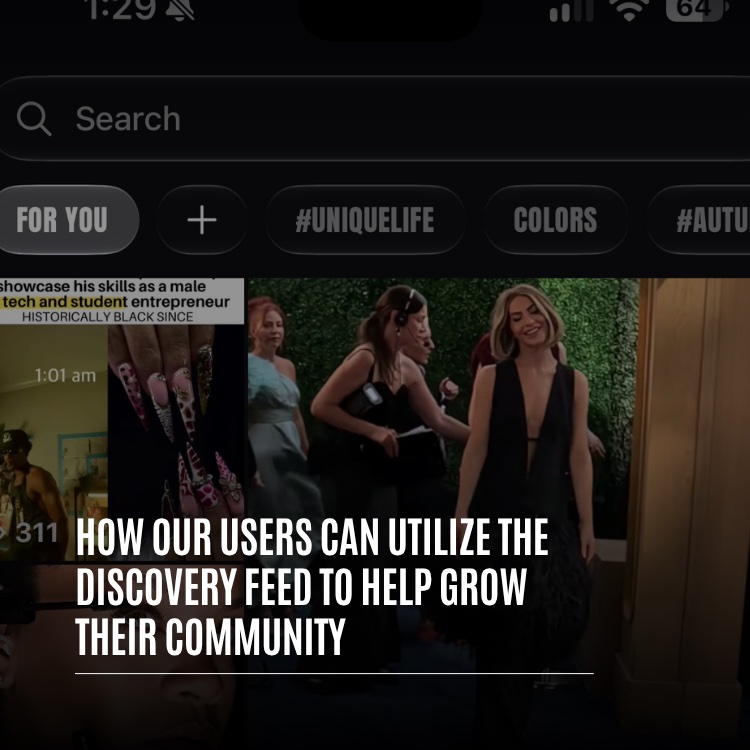
Discovery exists to break through that cap. It is a scrollable feed that shows up the moment someone taps search, before a single letter is typed, and it draws from all of Whistlr instead of just the accounts that person follows. For a business, it is the gap between speaking to people who already know you and getting introduced to a crowd you have never reached.
Three traits make that introduction especially valuable for brands and creators:
- The visitor is curious: Opening search is an active choice. Someone in that mindset is much more willing to drop into a stream, open a community or follow an account than a person idly scrolling past familiar names.
- Momentum beats scale: The sections that drive growth are tied to current activity, such as which communities are expanding fastest, which threads are busiest, which hashtags are picking up posts and which streams are on air right now. A big audience is not a requirement. An active one is.
- Communities get their own shelf: A full section is devoted to showcasing the communities gaining members most quickly. Energy you build inside your space can earn it a spot in front of newcomers, those newcomers add more energy, and the cycle continues.
In short, discovery favors businesses that stay active, say clearly who they are for and make joining simple. Every brand can control those three things, whatever its follower count. A tight-knit community with chatty members can sit alongside groups many times larger.
A Section-by-Section Tour of the Whistlr Discovery Feed
It pays to know what a visitor actually sees before you plan anything. Discovery is built as a vertical stack of sections, and each one offers a different route into Whistlr. Here is the lineup, along with what each part means for a business.
- Featured carousel and hashtag ticker: Discovery opens with a rotating set of featured moments plus a scrolling line of hashtags. Tapping any tag takes a visitor straight into that topic, which is a big reason your choice of hashtag matters.
- Live now: Broadcasts and live rooms that are on air at this moment, along with a Watch all button that lists every one. When you are streaming, this is where explorers can find their way in.
- Minis: A strip of short videos that leads into the full Minis experience. Plenty of people meet a brand for the first time through a clip without knowing whose it is.
- What everyone's talking about: The ten biggest hashtags on the app right now, ranked, with a post count beside each.
- Trending posts: Posts gaining traction across all of Whistlr.
- Join the conversation: The fastest-growing communities at the moment, shown next to the threads sparking the liveliest debate, plus a link to see every community.
- Music from Waves: New releases and playlists, with a link that opens Waves.
- News and featured posts: Newly published stories, featured posts and further reading.
- Keep exploring: When the curated sections run out, a never-ending mix of posts and Minis carries on for as long as someone keeps scrolling.
Look at how many of those sections depend on timing and participation more than on production value. A business that posts steadily, streams on a schedule and keeps its community chatting can turn up several times in one visit: in the ticker, under Live now, among the Minis and inside Join the conversation.
What Happens When Someone Starts Typing
Some visitors never browse at all. They already have something in mind, and for them the search bar stays fixed at the top of discovery. A tap on it reveals their past searches, a row of suggested hashtags labeled You may like (with a Refresh button for new suggestions) and what is currently trending. Once they begin typing, suggestions pop up right away for accounts, hashtags, songs, posts and communities.
Complete results are split into tabs, and each tab is a place your business can be found deliberately:
- Trending: Popular matches for the query.
- Minis: Short clips connected to the search.
- Waves: Music matches, handy for artists, venues and music-focused brands.
- Communities: Communities that relate to the search terms.
- Hashtags: Tags that fit the query.
- Flow: Live broadcasts, grouped in a tab of their own.
Search success is mostly a question of wording. When the name, handle and description of your profile or community spell out plainly what it covers, search has something concrete to match. If you make handmade candles, use those words. If your SubCircuit serves small-batch coffee roasters, put that phrase in its name or its description. A playful brand name is fine, as long as you pair it with the ordinary terms people really search for. Our guide on how to reach your target audience walks through choosing them.
Matching Your Business to the Right Discovery Doorway
Each discovery section opens a different door, and some doors fit some businesses better than others. You will see results fastest by focusing on the sections that line up with how you already work, then expanding once those are paying off.
Local Businesses and Storefronts
Physical businesses such as shops, cafes, studios and venues grow when strangers can picture the place. Minis and hashtags that feature your interior, your products and the familiar faces who return each week let someone imagine visiting before they ever arrive. Discovery puts that picture in front of people who have never heard of you.
When your business also has a Haven, use discovery and Nearby together. Post Minis and updates from the Haven's spot, tag them with a location-based hashtag and broadcast live from the premises, so a viewer who finds the stream can find the Haven as well.
Creators Running Their Brand as a Business
If you are a creator, your content acts as the entrance and your community is the inner room where fans get to know you better. Live now, Minis and trending posts are the sections that matter most to you. Each broadcast can be found by someone hunting for something to watch, and a great Mini can spread far past your followers. Always give viewers a pointer to your community so their interest has a place to go.
Community Owners and SubCircuit Builders
SubCircuit owners should concentrate on two channels: the Join the conversation section and the Communities tab in search. A sharp banner, a precise description, busy threads and consistent growth are what get a SubCircuit noticed by people browsing.
Music Brands, Artists and Venues
Music-led communities have an entrance most others lack, which is Waves. Shared playlists and group listening in live rooms let fans discover you through the music first and join the community afterward.
How to Earn a Spot in "Join the Conversation"
If your business runs a community, Join the conversation is the shortest path from discovery into your space. It displays community cards, each topped with its banner, beside the threads generating the most discussion. Since it spotlights whichever communities are growing quickest at the moment, momentum counts for more than age or headcount.
You control two things here, and each deserves an hour of your time before you try to drive traffic anywhere.
Your Banner Is Your Storefront Sign
Because every community card opens with its banner, that image is the first thing a visitor sizes up. A deliberate, well-made banner says the place is looked after. A default placeholder says nobody is home. Approach it like the sign over a shop entrance: true to your brand, readable in a glance and accurate about what waits inside.
Your Threads Are Your Window Display
One thread with real back-and-forth can be enough to draw a curious browser inside. Start the questions, comparisons and hot takes your members enjoy debating. For a business, that could be an argument over the best way to use a product, a vote on what to stock next or a showcase where members post what they have made. Aim for discussions people want to jump into rather than announcements they skip.
Discovery does not reward the biggest accounts. It rewards the ones that give a stranger a reason to stay.
A Weekly Discovery Routine for Brands and Creators
Winning with discovery has nothing to do with hacks. It comes from being reliably easy to find and genuinely worth joining. The routine below suits SubCircuits, Havens, storefronts and creator communities, and it fits comfortably into an ordinary week.
- Check your entrance. Make sure your community or profile name, handle, banner and description state precisely who it serves and what goes on there. People arriving from discovery make up their minds in seconds.
- Choose a single signature hashtag. Go for something short, specific and easy to recall, and ask members, staff and regulars to add it to relevant posts, Minis and threads. Gradually it collects enough posts to become a dependable route back to you.
- Schedule a recurring thread. A weekly challenge, prompt or showcase hands members an excuse to contribute and generates the discussion the communities section looks for.
- Stream at set times. Run a regular broadcast or live audio room, such as a weekly Q&A, a watch party or coverage of an event your community is attending. Each session gives you another shot at Live now and the Flow tab. Our live streaming guide explains the setup.
- Cut highlights into Minis. Turn great stream moments, event recaps and popular threads into short clips, and name your community so viewers know where to go next. The Minis guide covers formats that keep people watching.
- Answer every newcomer's first post. Respond quickly whenever someone posts for the first time. That early reply frequently determines whether they come back.
- See what drew people in. Look at where your visitors came from and fine-tune your titles, tags and topics. The measurement section below explains how.
A brand-new community needs some activity before you promote it. Start the threads you would want to find there and bring in a small group of founders who will genuinely take part. Because the communities section favors spaces that are already expanding and buzzing, have something worth showing before you invite strangers to look.
Converting Discovery Visitors Into Members and Regulars
Being discovered is only the first step. Discovery can bring visitors as far as your entrance, but whether they stick around depends on what they find inside. These practices are what turn a passing tap into lasting membership.
Explain Your Space in One Screen
Whatever sits at the top of your community works as your sales pitch. Pin a welcome thread or post that covers what the space is for, how members take part and what is planned next. Any newcomer should grasp how to join in within about a minute.
Keep the Rules Short and Visible
Clear guidelines make it easier to join a room full of people you do not know. A handful of brief rules, somewhere between four and eight, will get read, while a lengthy list tends to be ignored. Rules also show visitors that someone is caring for the space, which reassures anyone weighing whether to join.
Lower the Bar for the First Post
Nobody finds a community post harder to write than their very first. Ease the way with gentle prompts, such as asking people to say hello, name a favorite or share a picture of their setup. In a business community, something like "show us how you use it" is especially effective, because each reply lets newcomers see your product in someone else's hands.
Link Your Spaces Together
Few businesses on Whistlr exist in only one spot. You might have a SubCircuit for discussion, a Haven tied to a real address, a stream where people gather and a profile that connects them all. Whoever discovers one of these should be able to reach the others easily. Reference the Haven inside your SubCircuit, plug the SubCircuit during streams and use your profile description to list every place your community meets.
Measuring Whether Discovery Is Working
There is no need to guess whether discovery is delivering. In Creator Studio, Creator Insights breaks down the sources of your audience, covering search, profiles, feeds, reposts and recommendations. Those numbers show whether people are reaching you through discovery and search or mostly through your existing circle.
Treat the data as a testing ground. Adjust a single variable at a time, whether that is your banner, your hashtag, the subject of your weekly thread or your streaming schedule, and track how your traffic sources move over the next few weeks. If search starts sending more visitors once you tighten your description, that lesson applies to every space you manage. Our guide to insights explains how to interpret the figures.
Ask yourself a few questions each time you review the data:
- Is search climbing? A growing share from search means your names, descriptions and tags are working.
- Do streaming weeks stand out? Compare weeks that included a live session with weeks that did not.
- Which clips convert? Note the Minis that lead people to your profile or community, then produce more of them.
- Are new arrivals participating? Visitors who post are on the way to membership. Those who only browse may need a simpler first step.
Where the Whistlr Discovery Feed Fits Alongside Home, Trending and Highlights
Whistlr offers a few different places to browse, and each one does a different job in growing a business. Knowing the difference lets you set realistic goals for each.
- Home feed: Friends lead, and broader content follows. Existing followers and members see your updates here, so think of it as the channel that keeps people.
- Trending: What is gaining traction across the whole app at the moment, favoring posts people watch to the end and revisit. Clips designed to hold attention outlast clips designed only to win the opening second. Our Trending feed explainer goes into more detail.
- Highlights: A hand-picked collection of standout clips and big moments for someone with just a few spare minutes.
- Discovery feed: The space designed for finding what is new to each person, including the quickest-growing communities, the most-used tags and what is streaming now. Think of it as the channel that wins new people.
A strong business presence appears in every one of them. Followers catch you on their home feed, your strongest clips may land in Trending or Highlights, and discovery is where complete strangers see you for the first time.
Visibility, Privacy and Choosing What Gets Found
Showing up in discovery requires being visible, and on Whistlr you always decide whether to be. Discovery only draws on posts and communities that are public to begin with. A public profile means your posts are eligible to appear. A private profile keeps your posts limited to friends and out of public discovery entirely. Private communities stay closed, and your privacy settings keep governing how others see your account and posts.
That gives businesses the power to set how findable each space is. Anyone browsing can come across a public SubCircuit or Haven, while a private one stays limited to the people you bring in. Plenty of communities run one of each, with a public space for attracting newcomers and a private space for a core group such as longtime customers or collaborators.
Frequently Asked Questions
What does the Whistlr discovery feed show?
It is the scrollable feed that opens when you tap search, before typing. It combines featured moments, a hashtag ticker, live broadcasts, Minis, the ten biggest hashtags, posts gaining traction, the quickest-growing communities, music from Waves, news and a never-ending Keep exploring section, with search fixed at the top.
Can a small brand grow through discovery without many followers?
Yes. The sections that drive growth reflect what is happening now, including which communities are expanding, which threads are busy, which hashtags are gaining posts and which streams are on air. An active small community can sit alongside far bigger ones.
How can my community appear in Join the conversation?
That section highlights the communities growing quickest at the moment next to the threads generating the most debate. A polished banner, a precise description, a weekly thread, one consistent hashtag and scheduled live sessions all improve your odds of being featured.
What is the best way for a business to use hashtags on Whistlr?
Choose one short, specific tag, use it on every relevant post, Mini and thread, and encourage members and regulars to do likewise. Tags appear in the discovery ticker, the ranked hashtag list, the suggested hashtags in search and the Hashtags results tab, so a steady tag builds a route back to you.
Do private accounts or private communities show up in discovery?
No. Discovery only draws on public posts and communities. A private profile keeps posts limited to friends, and a private community is visible only to its approved members.
How do I know whether discovery is sending people my way?
Open Creator Insights in Creator Studio to see your audience sources, including search, profiles, feeds, reposts and recommendations. Change one variable at a time, such as your banner, hashtag or streaming schedule, and watch how those sources move.
Everyone browsing discovery is hoping to land somewhere worthwhile. Make your business simple to find, quick to understand and painless to join, and the next visitor who taps through could turn into a regular. Open search, check where your brand shows up today, and pick the step from the routine above you have not tried yet.